
AV CONTROLLER

star
16.6K reviewsinfo

USK: All ages
info
1M+
Downloads

USK: All ages
Learn more


About this app
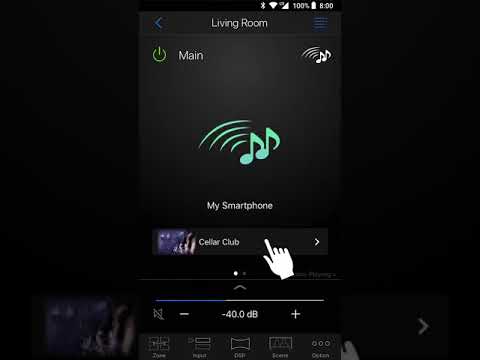
This AV Controller app will turn your Android device into a Wi-Fi enabled remote control for your Yamaha network products(*). This App provides you the flexibility to control the available inputs, volume, mute and power commands. It lets users change a song from Internet Radio, USB and command FM/AM tuners or any other internally available source. Music Play feature allows you to stream music tracks directly from your Android Device to Yamaha network products to so you can enjoy high quality music through your AV system.
Screen sizes of Tablet devices are also supported.
It’s great to have all this control at your fingertips - and best of all it’s FREE!
(*)Please check compatible model list below.
Available in
English, Français, Deutsch, Español, Italiano, Português, Svenska, Dansk, Suomi, Norsk Bokmål, Nederlands, Polski, Pусский,日本語, 简体中文, 繁體中文, 한국어, Thai, עברית, Український, Tiếng Việt, Bahasa Indonesia, Bahasa Melayu, Türkçe
Requirements
- Android 5.0 or higher
- A wireless Local Area Network (LAN) and a compatible Yamaha Network product(s)* residing within the same LAN.
- Network Standby set to ON
Key Features
- Power on/off
- Volume up/down
- Mute
- Music Play
- Input Selection
- DSP Mode Selection
- SCENE selection
- Blu-ray player fundamental control
- Seemless control between the Yamaha AV receiver and Blu-ray player
- Demo mode - Explains how to use this app
Please refer to the following site for compatible models.
https://uk.yamaha.com/en/products/audio_visual/apps/av_controller/index.html
This application performs following functions for purposes described below.
- Making a connection under Wi-Fi enabled environment
The application uses Wi-Fi function on your mobile terminal for the purpose of operating network-enabled devices.
- Accessing to music information stored in your smartphone / tablet
This application accesses to music information stored in your smartphone / tablet for the purpose of displaying, playing and editing the music information and/or playlist.
The App turns Android device into a WiFi remote control for select Yamaha model
Updated on
Safety starts with understanding how developers collect and share your data. Data privacy and security practices may vary based on your use, region, and age. The developer provided this information and may update it over time.
- No data shared with third partiesLearn more about how developers declare sharing
- No data collectedLearn more about how developers declare collection


Ratings and reviews
14.7K reviews

Mai Daiing Bride
- Flag inappropriate
October 21, 2022
Everytime I do use the search in Netradio and tip on a station for listening and want to jump back to my search list, the list jumps back to the start and it's first Station. Can't you program a flag for sticking just in the point of the list, where I left it? That is really annoying. But all the other options are working fine. Keep going to update it. Thank you
6 people found this review helpful

Jörg Zieren
- Flag inappropriate
March 25, 2025
A decent remote control app was the main reason we bought a Yamaha receiver. This just works, while most others (at least a few years ago) didn't. Good Internet radio support with a large catalog and a favorite system. The only thing missing is the ability to add a custom URL.
1 person found this review helpful

Mark Clark
- Flag inappropriate
- Show review history
August 21, 2026
This app used to work sporadically, but now it doesn't work at all. It doesn't even find the receiver on the network, despite being in network standby mode. Even entering the IP address manually does nothing. They haven't even bothered to update this app in 4 years. Don't waste your time even installing.
11 people found this review helpful
What’s new
- Bug fixes
USK: All ages
Learn moreApp support
About the developer
YAMAHA CORPORATION
ycmk-mobileappdesk-SMB@music.yamaha.com
10-1, NAKAZAWACHO, CHUO-KU
HAMAMATSU, 静岡県 430-0904
Japan
+81 53-460-3384


